Airbnb's Quick Replies: A User's Guide to Saving Time
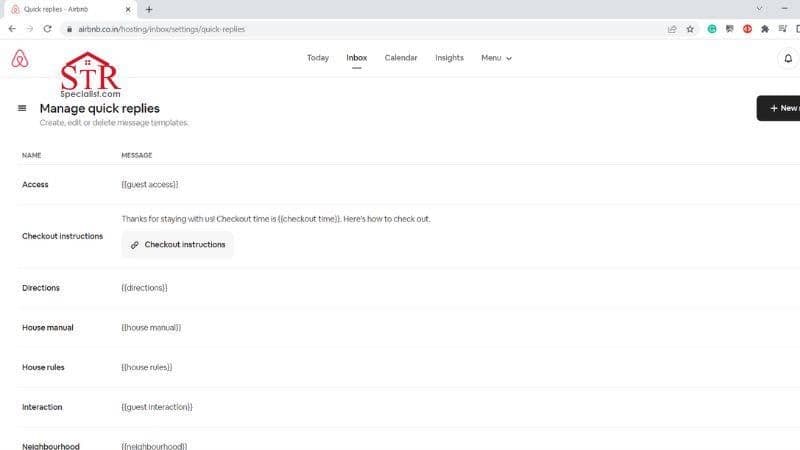

The reliability and efficiency of an Airbnb host is greatly influenced by their response time and rate. Maintaining high scores requires prompt replies to every guest’s query or request, which can become repetitive and less efficient when you're frequently answering the same questions.
Typically, Airbnb hosts are asked recurring questions like, "What is the Wi-Fi password?", "Where is parking available?", or "How can I find your place?".
Thankfully, the solution to this repetitiveness lies in Airbnb's Quick Replies feature. This tool significantly reduces time spent on recurring inquiries, thus improving efficiency.
 Follow the steps below to utilize Airbnb's Quick Replies feature:
 In the context of Airbnb's Quick Reply feature, shortcodes are crucial for auto-filling guests' listing details and reservations. If the required listing information isn't provided, the shortcode will appear as unavailable.
Some frequently used quick reply shortcodes include:
In the context of Airbnb's Quick Reply feature, shortcodes are crucial for auto-filling guests' listing details and reservations. If the required listing information isn't provided, the shortcode will appear as unavailable.
Some frequently used quick reply shortcodes include:
Understanding the Quick Reply Feature on Airbnb
Airbnb's Quick Replies feature empowers hosts to use templates for responding to common inquiries. An effective messaging strategy using these templates enhances your guests' experience, particularly for those visiting for the first time. Despite this, establishing effective communication with guests has long been a challenge for many hosts. Thankfully, the Quick Replies feature offers a practical solution to this issue.The Advantages of Using Airbnb's Quick Reply Feature
With the rollout of Airbnb's Quick Reply feature, hosts have experienced these notable advantages:1. Enhances Clear and Efficient Communication
Sally, a host from Snoqualmie, Washington, testifies that the quick reply templates have streamlined her communication process. She recounts an instance where she was able to respond to four guest inquiries in under 10 minutes using these templates. The Quick Reply feature lets you prepare precise, suitable, and well-edited responses beforehand. This prevents the risk of delivering vague or inappropriate responses to your guests, particularly when you're pressed for time and dealing with multiple requests or inquiries simultaneously.2. An Ideal Tool for Enhancing Your Response Time and Rate
Your response time and rate, which indicate how promptly you address inquiries, reservation requests, and other guest queries, are crucial metrics in Airbnb hosting. Airbnb typically tracks and displays these statistics on the hosts' dashboard. For those utilizing professional hosting tools, this information can be found under the "requests" section. The Quick Reply feature is a perfect tool for improving these crucial metrics. Maintaining stellar response rates significantly influences your likelihood of attaining or preserving the prestigious Superhost status. One effective strategy to keep your response time and rates optimal is leveraging the Airbnb Quick Reply feature. As you effectively address your guests' concerns, their satisfaction increases, thereby boosting your odds of retaining the Superhost status. Through the Quick Reply feature, you're enabled to generate templates that facilitate: 1. Prompt acceptance or rejection of reservation requests from guests 2. Swift responses to new inquiries3. Accessible for Use by Additional Team Members
In case you're hosting with a team, members who have guest management permissions are also able to use the Quick Reply templates that you've created to respond to guests. These saved messages can be accessed via the team's shared inbox.Setting Up Quick Replies on Airbnb
Follow the steps below to utilize Airbnb's Quick Replies feature:
- Navigate to your hosting inbox.
- Click on the folder menu, select "quick replies," and choose "+New Reply."
- Input a name for your template for identification purposes. Rest assured, this will not be visible to the guests.
- Craft your message, then add shortcodes for seamless message personalization, such as names and other guest-related information.
- Choose a language that corresponds with the one you used in crafting your message. This is important as it influences how Airbnb will interpret the shortcodes.
- Save your crafted template.
Navigating to Airbnb's Quick Replies Templates
Once you've created various templates and saved them, they can be accessed as follows: Navigate to your hosting inbox, select a conversation with your guest, choose a fitting reply, and click on "use this reply" to input the content into the message box. At this stage, you can also make any necessary adjustments to your quick replies.Modifying Airbnb Quick Replies: Is It Possible?
Indeed, it is.- Navigate to your hosting inbox.
- Access the folder menu.
- Choose quick replies.
- Modify the message of your choice.
- Save your updated message.
Understanding Shortcodes in Airbnb's Quick Replies
In the context of Airbnb's Quick Reply feature, shortcodes are crucial for auto-filling guests' listing details and reservations. If the required listing information isn't provided, the shortcode will appear as unavailable.
Some frequently used quick reply shortcodes include:
- Guest's name
- Dates of check-in and check-out
- Cleaning charge
- Wi-Fi access details
- Booking confirmation code
- Location of the listing
- Average cost per night
- Guidance to the property
- Information about the home
- Details of the main host
- Facilities and amenities available